Batch Pricing from CSV
What it is
Batch Pricing lets you upload a CSV file containing multiple diamonds and receive a recommended sale price for every stone in a single operation. Instead of entering each diamond through Certificate Lookup or By Parameters, you upload your file, map its columns to the fields the platform expects, and get results for the entire batch. The workflow has three steps: upload, map columns, and review results.
Why you'd use it
- You received a new shipment or memo parcel and need prices for every stone before making buying decisions.
- You want to compare a supplier's asking prices against real market data across an entire inventory list.
- You already have listed prices and want to audit them against current market conditions to spot overpriced or underpriced stock.
- Entering stones one at a time through By Certificate or By Parameters is too slow for the volume you handle.
Step-by-step
- Open the sidebar and go to Recommendations → Batch Upload (or visit
/app/recommendations/batch). - Set the global settings at the top of the page. These apply to every stone in the batch:
- Pricing Profile — pick the profile whose margin and strategy rules should apply. Defaults to your default profile.
- Region — filter market data to a geographic market (GB, EU, US, or AU). Leave blank for global data.
- Currency — the currency for supplier prices in your CSV and for the output recommendations.
- Diamond Type — Natural or Lab-Grown.
- Drag a CSV file onto the drop zone, or click it to open a file picker. The file must be
.csvformat and under 10 MB. - After upload, the platform shows a File Preview card with the filename, file size, row count, and a sample of your data. Below it, a Column Mapping card displays a dropdown for each diamond attribute.
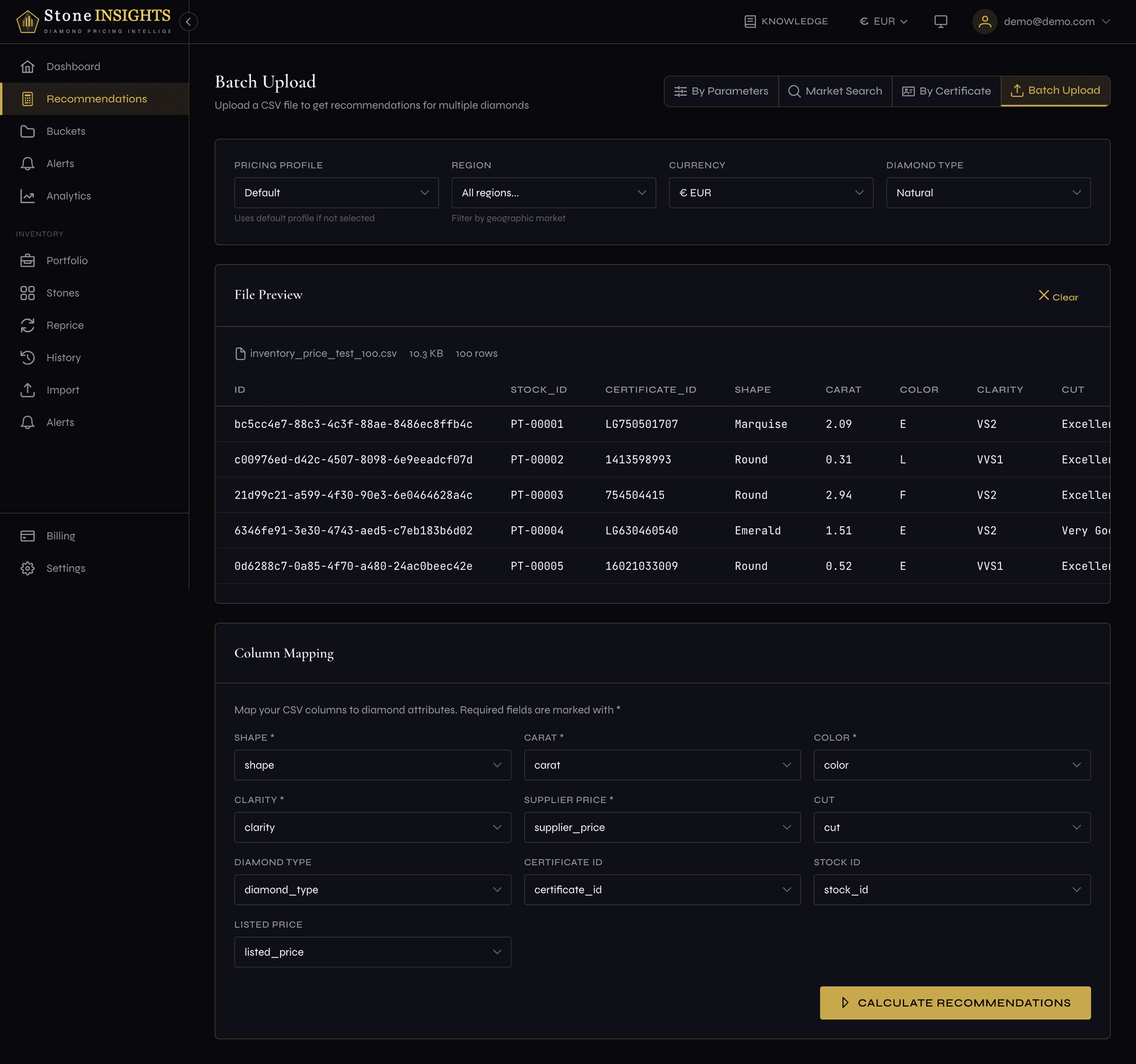
- The platform suggests a mapping based on your column headers. Review each dropdown and adjust if needed. Required fields are marked with an asterisk — all five must be mapped before you can continue.
- Click Calculate Recommendations. The platform processes every row against the pricing engine.
- Review the results:
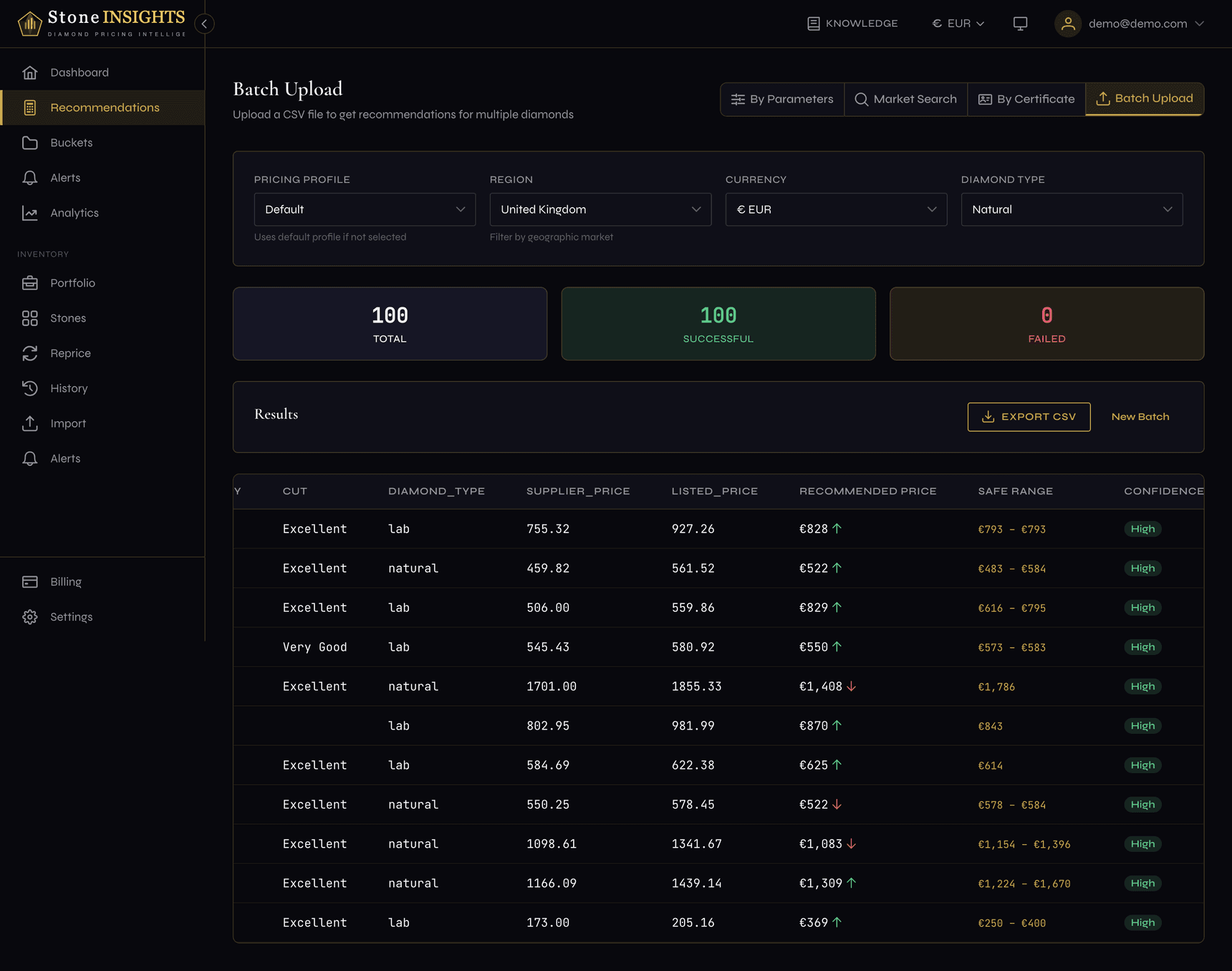
- Three summary cards show the total stones processed, successful calculations, and failed calculations.
- The results table lists every stone with its original CSV data, recommended price, safe price range, confidence level, and status.
- A green up arrow next to the recommended price means it is above the supplier price. A red down arrow means it is below.
- Click a safe range value to view the matching market bucket.
- Click Export CSV to download the results as a file. The export includes the original data plus the recommended prices and confidence levels.
- To price another file, click New Batch to reset and start over.
Field reference
Global settings
Pricing Profile (optional) The profile whose margin and strategy rules are applied to every stone. Defaults to your default profile. See Create Your Pricing Profile for how profiles work.
Region (optional) Restricts market data to a geographic region. Leave blank to use global data or your account's default region.
Currency (optional) The currency for supplier prices in your CSV and for the output recommendations. Defaults to your account's active currency.
Diamond Type (optional) Natural or Lab-Grown. Controls which market data pool the platform uses. Defaults to Natural.
Column mapping
Shape (required) The diamond's cut shape. Accepted values: Round, Princess, Cushion, Emerald, Oval, Radiant, Pear, Asscher, Marquise, Heart.
Carat (required)
The diamond's weight as a decimal number — for example 1.50.
Color (required) The GIA color grade, from D to M.
Clarity (required) The GIA clarity grade, from FL to I3.
Supplier Price (required) The price you pay the supplier for the stone. Must be in the currency selected in the global settings.
Cut (optional) Cut quality grade: Excellent, Very Good, Good, Fair, or Poor. Applies primarily to Round diamonds.
Diamond Type (optional) Overrides the global Diamond Type setting for individual rows. Accepts Natural or Lab-Grown.
Certificate ID (optional)
The lab certificate number (e.g., GIA-1234567890). Included in results for reference but does not change the pricing method — batch pricing always uses parameter-based matching.
Stock ID (optional) Your internal inventory identifier. Passed through to the results and export for tracking.
Listed Price (optional) Your current retail or list price. Passed through to the results so you can compare against the recommendation.
Tips and common mistakes
The platform enforces size limits to keep batch processing fast and reliable.
The currency setting deserves extra attention because it affects how supplier prices are interpreted.