Organize Stones into Buckets
What it is
A bucket is a market segment defined by a set of rules — shape, carat range, color, clarity, and optionally cut and diamond type. The platform continuously tracks price statistics, supply volume, and trends for every bucket. You create buckets for the segments you trade in, then use them as dashboards to monitor market conditions. Stone Insights also maintains system buckets covering common segments that every user can browse.
Why you'd use it
- You trade in a few specific segments — say round 1-carat G–H VS — and want a dedicated dashboard for each one.
- You want to spot price movements in your niche before they affect your inventory or listed prices.
- You need percentile data (P25, P50, P75) for a segment to anchor your pricing decisions against real market distribution.
- You plan to set up market alerts and need a bucket to attach them to. Alerts are per-bucket — no bucket, no alert.
Step-by-step
Create a bucket
- Open the sidebar and go to Buckets (or visit
/app/buckets). - Click Create Bucket in the top-right corner. The creation form opens.
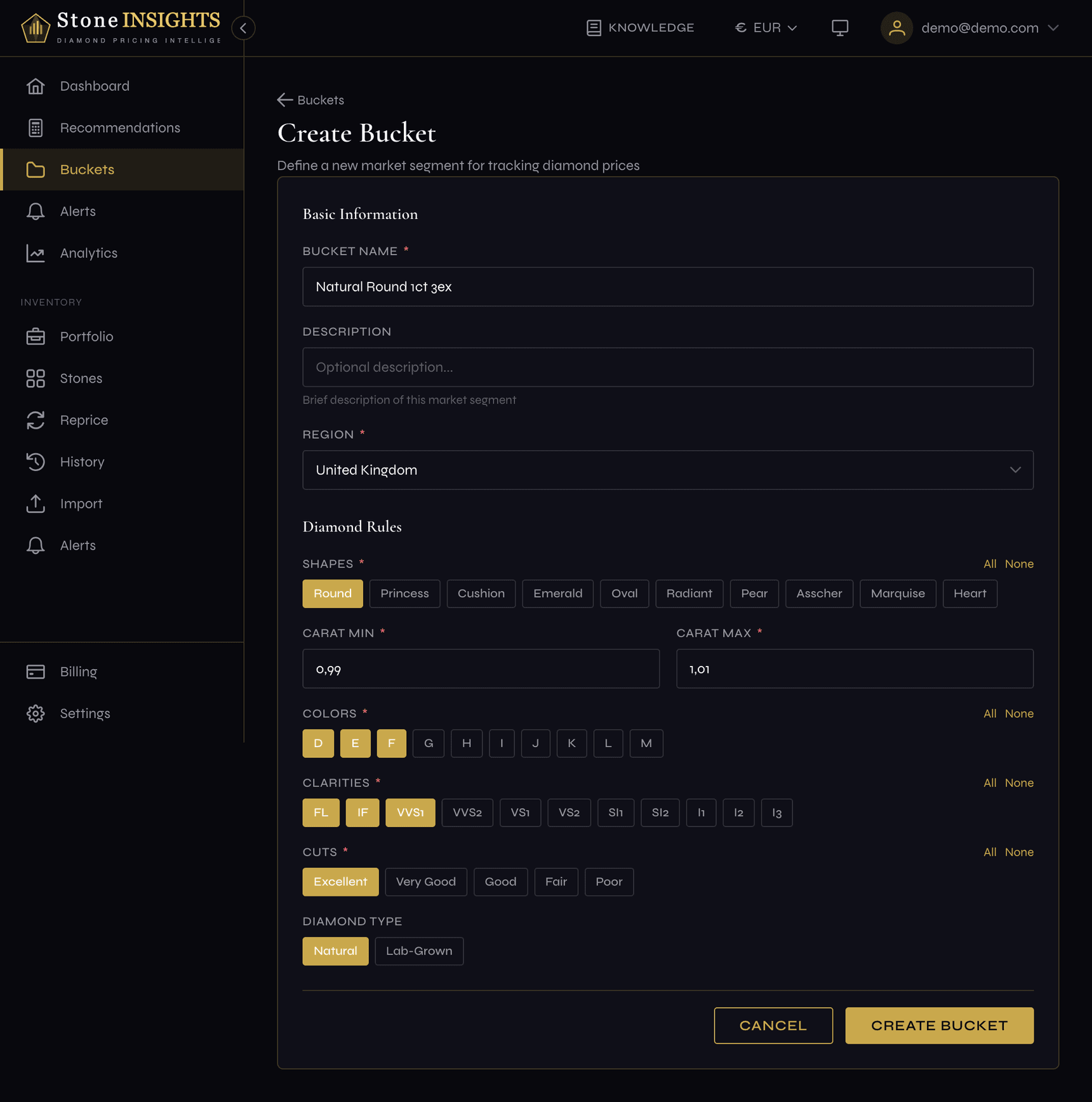
- Enter a Bucket Name and optionally a Description.
- Select a Region to scope the market data geographically.
- Define the segment rules: pick one or more Shapes, set a Carat range (min and max), and select Colors and Clarities. If you selected Round, the Cuts field appears — pick the cut grades to include.
- Choose the Diamond Type — Natural or Lab-Grown. Defaults to Natural.
- Click Save. The platform creates the bucket and redirects you to its detail page.
Read bucket statistics
- Open any bucket from the list on the Buckets page, or navigate directly to
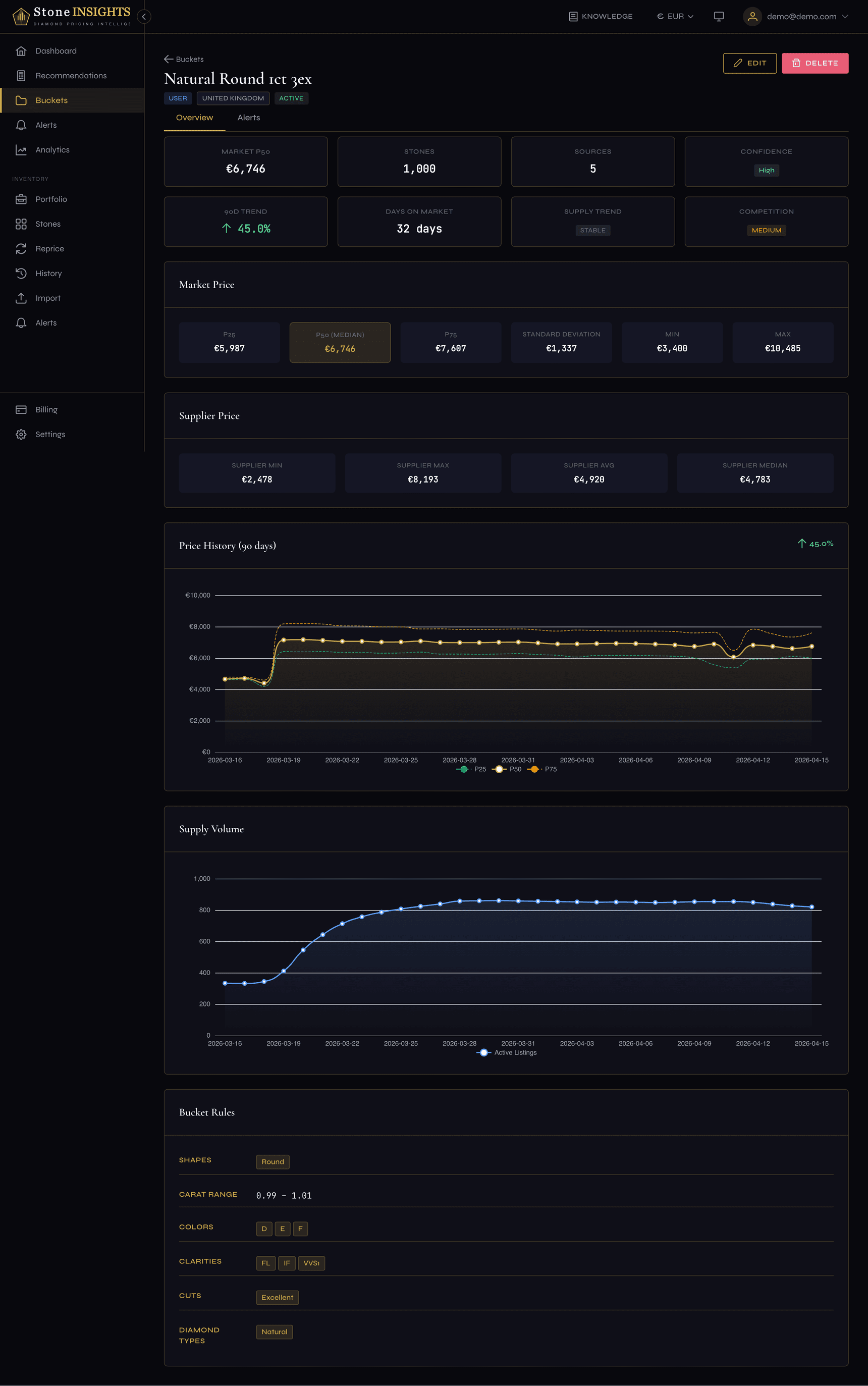
/app/buckets/{id}. - The Overview tab shows three areas:
- Statistics cards — P25, P50 (median), and P75 market prices, plus stone count and source count.
- Price history chart — a 90-day trend of median market price for the segment.
- Supply volume chart — active listings, new listings, and delisted counts over the same period.
- Below the charts, a Rules summary shows the exact criteria that define this bucket.
- For system buckets, use the Region selector at the top to switch between regional views of the same segment.
Field reference
Bucket Name (required)
A short, descriptive label for the segment — for example Round 1ct G-H VS. Must be unique across your buckets.
Description (optional) A longer note explaining what this bucket tracks or why you created it.
Region (required) The geographic market to track: GB, EU, DE, US, AU, or BG. Cannot be changed after creation.
Shapes (required) One or more diamond shapes to include: Round, Princess, Cushion, Emerald, Oval, Radiant, Pear, Asscher, Marquise, Heart.
Carat Min (required)
The lower bound of the carat range — for example 0.50.
Carat Max (required) The upper bound of the carat range. Must be greater than Carat Min.
Colors (required) One or more GIA color grades to include.
Clarities (required) One or more GIA clarity grades to include.
Cuts (conditional) Cut quality grades: Excellent, Very Good, Good, Fair, or Poor. This field appears only when Round is selected in Shapes.
Diamond Type (optional) Natural or Lab-Grown. Defaults to Natural. Determines which market data pool the platform uses for this bucket.
Tips and common mistakes
Naming matters more than you'd expect once you have a dozen buckets in your list.
One setting is permanent and deserves extra attention.
Next step
Next: Set Up Market Alerts →